
In addition to the packages provided as part of the Babraham Molbio Software Repository our site also runs a central server which runs several packages of use for molecular biology. These packages are paid for centrally and you do not need to pay to access them. This guide tells you how to get access to these packages.
Most of the molecular biology programs available do not run on your desktop computer. They run on a Unix machine called Bihpc1 which is sat in the computing department. You therefore need to access this machine remotely from your desktop computer. Once you have accessed Bihpc1, the windows for the programs will appear on your desktop computer, as they would for any other program.
In order to access Bihpc1 you will need a user name and password. If you do not currently have a password for this machine (or if you've just forgotten it), then you should contact computing on extension 6222.
In order to allow the programs from bi-hpc1 to display on your desktop machine you need to have a piece of software called an X server installed on your machine. Babraham have a site license for an X server called Exceed, but this is not installed by default. To get Exceed installed on your machine simply call computing and give them the BICRN number of your desktop.
The Bioinformatics group have created a script which allows you to log on to Bihpc1 and this is available in the Babraham Molbio Software Repository.

Simply double-click on the icon and you will be prompted for your username and password.
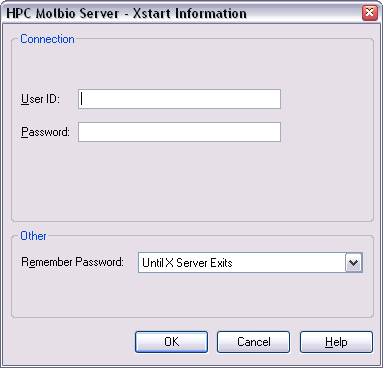
You should enter your user name and password in the appropriate boxes. The program will then start up, and should produce a menu system which looks like this.
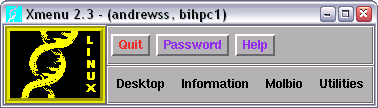
This window is called the Xmenu, and is a way for you to start all of the programs which are available on Bio4.
The very first time you use the Xmenu system you need to run a program which will configure your system to run all of the programs correctly. You only ever need do this once and the system will remember the changes the next time you log in.
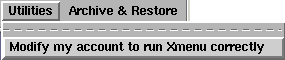
To make the changes you need to go into the "Utilities" menu and select "Modify my account to run Xmenu correctly". A white box will briefly flash up then dissapear - and that's it. If you're not sure whether you have done this before, then do it again. Running this program twice (or even a hundred times) won't cause any harm!
All of the programs you are likely to use are located in the "Mol Bio" menu.
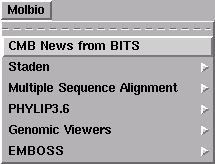
| CMB News | Back copies of messages to the Molmail mailing list |
|---|---|
| Staden | A package used for assembling sequencing projects |
| Multiple Sequence Alignment | A selection of stand-alone packages for creating and viewing sequence alignments |
| PHYLIP | A comprehensive phylogeny package |
| Genomic Viewers | The Artemis and ACT genome viewers (both of which are also available as desktop packages in our software repository). |
| EMBOSS | A multi-function, command-line sequence analysis package - of interest to advanced users |
Selecting the relevant program will open a new window in which the program will run.